Last week I was working on an extension for a customer. I had to build it from the ground up but ran into some issues regarding service connections while using the documentation of Microsoft. My goal was to create an extension with a token-based service connection.
I have never created an extension that required a service connection. So everything was new to me. A problem I ran into was that the service connection just wouldn’t show up in Azure DevOps, but the CI/CD building of the extension did not give any configuration errors. None of the solutions offered on the Microsoft Docs website worked for me. After a while of trying and debugging, I gave up and went looking for examples on GitHub. I knew about the SonarQube extension, that extension has a service connection. Luckily it is an opensource repository on GitHub. So I compared their vss-extension.json with mine and found some differences.
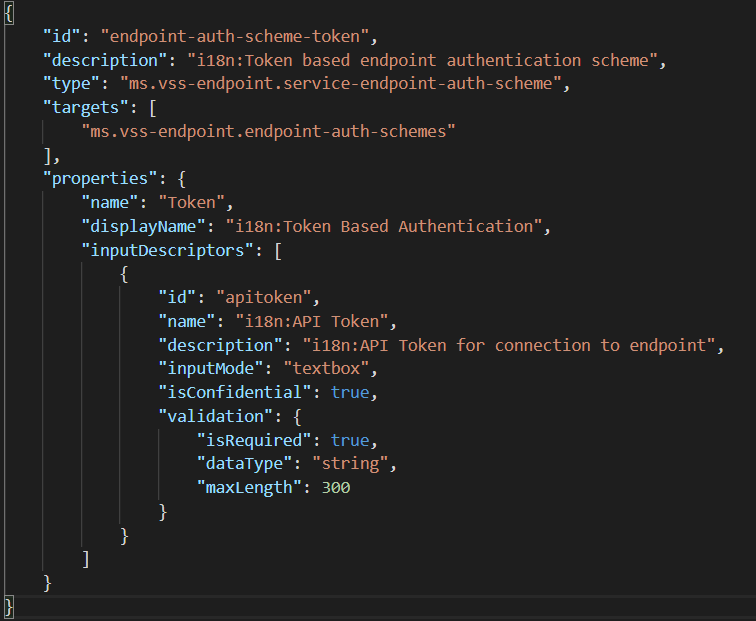
Above is a somewhat example of the JSON file I created. Compared to the SonarQube extension it was missing some critical components like an authenticationScheme with a token schema type. Also, the type and target are pointing towards an auth scheme, but these should just point to the “service-endpoint-type”.
Every property above the “properties” block should focus on the service connection and not on schemes. In the code-block below I fixed all these issues.
End result
The end result to create a token-based service connection:
| { | |
| "id": "endpoint-auth-scheme-token", | |
| "description": "i18n:Token based endpoint authentication scheme", | |
| "type": "ms.vss-endpoint.service-endpoint-type", | |
| "targets": [ | |
| "ms.vss-endpoint.endpoint-types" | |
| ], | |
| "properties": { | |
| "name": "Token", | |
| "displayName": "i18n:Token Based Authentication", | |
| "authenticationSchemes": [ | |
| { | |
| "type": "ms.vss-endpoint.endpoint-auth-scheme-token", | |
| "headers": [ | |
| { | |
| "name": "Authorization", | |
| "value": "{{endpoint.apitoken}}" | |
| } | |
| ], | |
| "inputDescriptors": [ | |
| { | |
| "id": "apitoken", | |
| "name": "i18n:API Token", | |
| "description": "i18n:API Token for connection to endpoint", | |
| "inputMode": "textbox", | |
| "isConfidential": true, | |
| "validation": { | |
| "isRequired": true, | |
| "dataType": "string", | |
| "maxLength": 300 | |
| } | |
| } | |
| ] | |
| } | |
| ] | |
| } | |
| } |
Updated the Microsoft documentation
The Microsoft Docs is opensource. This means everyone can update the documentation pages, so I decided to create a (my first) pull request to update the schemes and the PR got accepted! That was such a cool feeling. My changes can be seen on the Microsoft Docs page about authentication schemes.
Conclusion
This is what I came across while working with a custom extension. I hope it gave you some insight if you ran across the same problems. If it did not help, let me know.
 John Lokerse | Azure & DevOps Engineering