GitHub Copilot CLI is a harness to interact with AI directly from your terminal. By default, it uses the models provided through your GitHub Copilot subscription, but did you know you can bring your own key and connect to an external provider? I have an OpenCode Go subscription to use the Chinese models such as GLM and Kimi, and these are not available by default in GitHub Copilot.
GitHub Copilot CLI welcomes models outside their subscription, and on top of that you can use the full Copilot CLI experience, including autopilot mode!
In this blog, you will learn how to configure GitHub Copilot CLI to route its requests to your OpenCode Go subscription using the Bring Your Own Key (BYOK) feature. I will show you the exact environment variables to set and how to verify everything is working.
Prerequisites
Before you begin, make sure you have the following:
- An active OpenCode Go subscription and a valid API key.
- A model from your OpenCode Go subscription that supports tool calling and streaming. These capabilities are required for Copilot CLI to function correctly.
- GitHub Copilot CLI installed
High-level overview
GitHub Copilot CLI supports external providers through four environment variables. When these are set, the CLI sends requests to your specified endpoint instead of the GitHub Copilot backend.
The variables are:
| Variable | Description |
|---|---|
COPILOT_PROVIDER_TYPE | The provider format. For OpenCode Go, this is openai. |
COPILOT_PROVIDER_BASE_URL | The base URL of the API endpoint. For OpenCode Go, use the https://opencode.ai/zen/go/v1 endpoint. |
COPILOT_PROVIDER_API_KEY | Your personal OpenCode Go API key. |
COPILOT_MODEL | The specific model ID you want to use, for example glm-5.1. |
Configuration
Configuring the connection takes only a few steps. You can set the environment variables in your current terminal session, or add them to your shell profile to make them persistent. Below is the configuration for the OpenAI-compatible endpoint, which I have verified with my OpenCode Go subscription.
Bash
If you are using Bash, set the variables like this:
export COPILOT_PROVIDER_TYPE=openaiexport COPILOT_PROVIDER_BASE_URL=https://opencode.ai/zen/go/v1export COPILOT_PROVIDER_API_KEY=YOUR_OPENCODE_GO_KEYexport COPILOT_MODEL=kimi-k2.6
PowerShell
If you are using PowerShell, set the variables like this:
$env:COPILOT_PROVIDER_TYPE="openai"$env:COPILOT_PROVIDER_BASE_URL="https://opencode.ai/zen/go/v1"$env:COPILOT_PROVIDER_API_KEY="YOUR_OPENCODE_GO_KEY"$env:COPILOT_MODEL="kimi-k2.6"
After setting these variables, run the Copilot CLI as you normally would:
copilot
To verify if the model is loaded correctly you will see the selected COPILOT_MODEL in the bottom right corner:
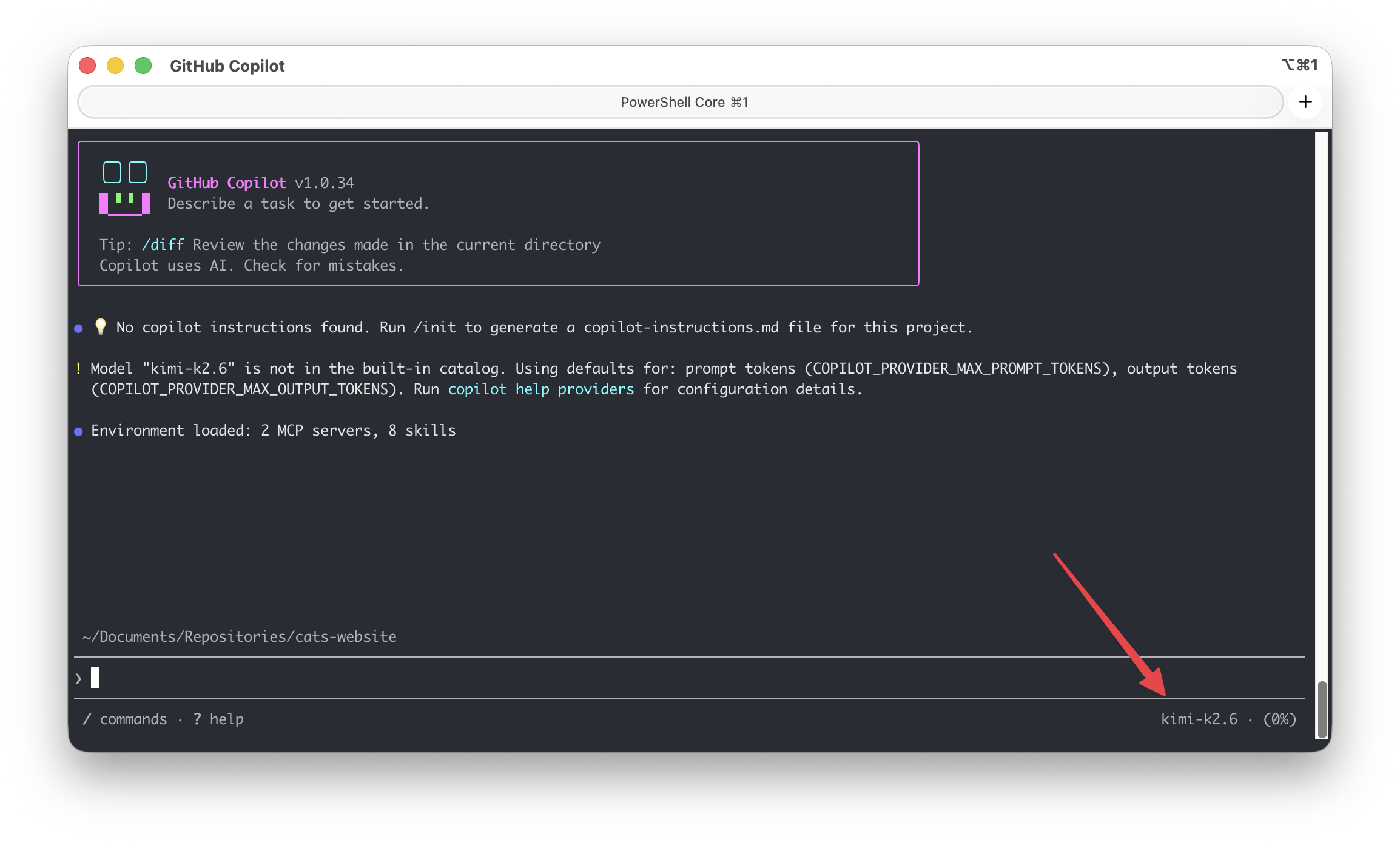
The CLI will now route all requests to your OpenCode Go subscription using the specified model.
Choosing a model
The model you choose must be compatible with the provider type you have configured. Models such as GLM 5.1, Kimi K2.6, Qwen3.6 Plus, and more are available through the OpenAI-compatible endpoint. Check out the OpenCode documentation for the full list of model IDs and their endpoint types: https://opencode.ai/docs/go/#endpoints
If you want to switch models, simply update the COPILOT_MODEL value to switch between them. For example, to use a different model:
Bash
export COPILOT_MODEL=glm-5.1
PowerShell
$env:COPILOT_MODEL="glm-5.1"
Autopilot mode
Since we are using the GitHub Copilot CLI harness, we can make use of autopilot mode. Unlike the standard chat mode where you interact turn by turn, autopilot allows the agent to work autonomously. The agent reads your codebase, makes changes across multiple files, and executes steps without requiring your confirmation at each stage.
To activate autopilot mode you can cycle through the modes with SHIFT+TAB until you see autopilot.
Example: implementing a theme toggle
In the example below, GLM 5.1, from my OpenCode Go subscription, is used in autopilot mode to implement a theme toggle for a website. The agent reads the existing HTML and CSS, adds the necessary toggle logic, and updates the stylesheet:
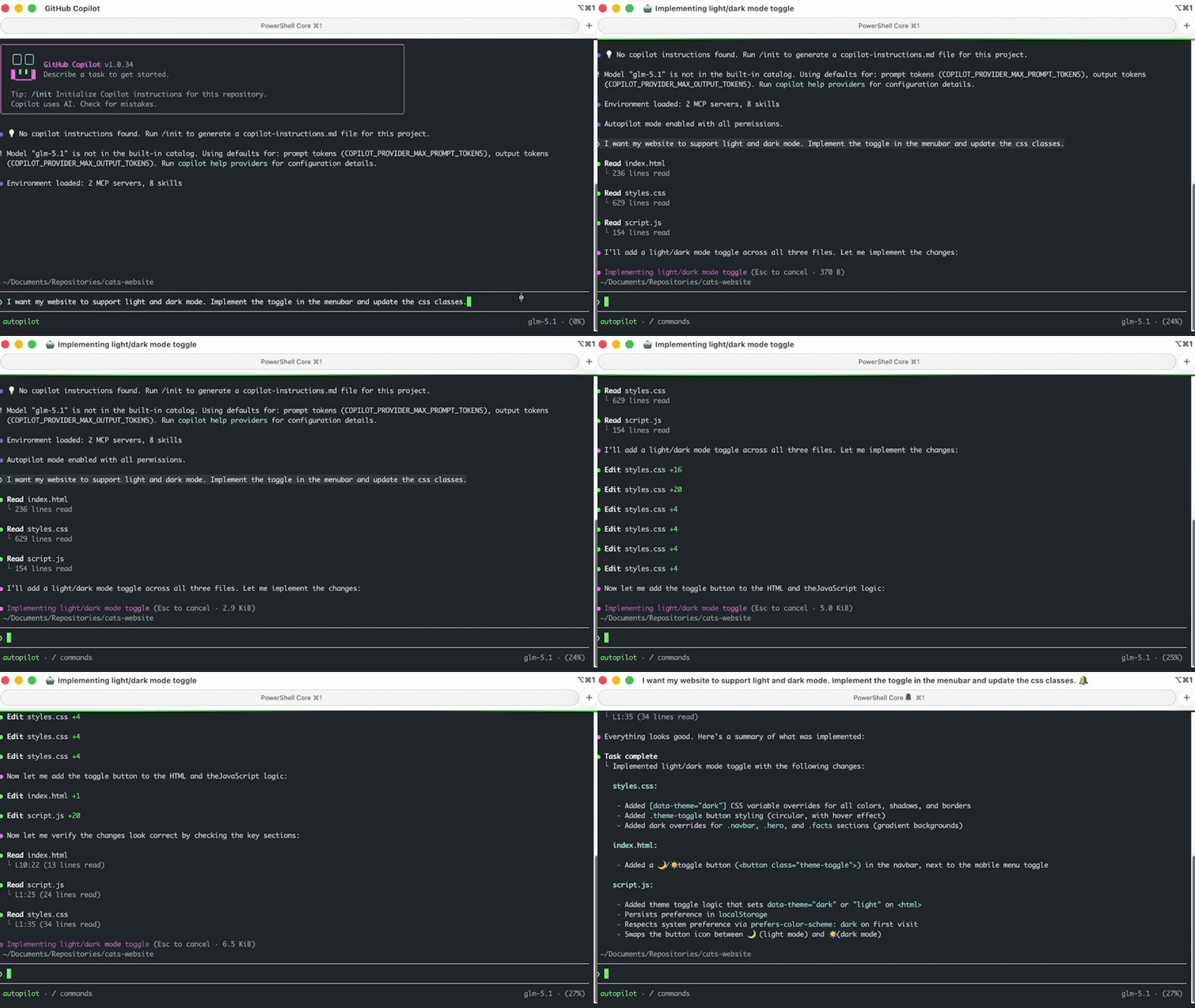
Note! Since autopilot can modify multiple files at once, it’s recommended to work in a git repository so you can easily review or revert changes.
Conclusion
By leveraging the Bring Your Own Key feature in GitHub Copilot CLI, you can power your AI workflow with the models available in your OpenCode Go subscription. GitHub Copilot gives you flexibility over model choice and allows you to utilise models outside the GitHub Copilot subscription, but with the familiar Copilot CLI features.
The BYOK feature is not limited to OpenCode Go, but you can also use models from Microsoft Foundry, OpenRouter, and more!

