Code reviews can be a tough and frustrating experience due to long wait times, nitpicking, constant context switching, and many other reasons. GitHub has offered AI-assisted code reviews for quite some time already, but unfortunately Azure DevOps has not. I wanted to see if I could improve the pull request experience by introducing an AI-powered code reviewer for Azure DevOps.
In this blog, you will learn how to create your own automated code reviewer for Azure DevOps pull requests, powered by Large Language Models (LLMs) using Microsoft Foundry. You will also learn how to configure Azure DevOps to securely implement the reviewer, how to set up the required scripts and pipeline, and how to personalise the review process using prompt files.
Automated code reviewer: concept and requirements
The goal is to create a seamlessly integrated and low-cost automation for the code review of a pull request. To achieve this, the following requirements are important for success:
- The code review must be powered by an effective but low-cost model.
- The model’s response must produce a consistent, structured JSON output so it can be used for further automation.
- Automated pull-request comments must be placed at the exact line of code where the model has feedback.
- The code review must be integrated into the pull request and triggered automatically when the pull request is first created.
- The code review must be constructive and easy to understand.
To access the latest models, we will use the Microsoft Foundry platform. This platform enables organisations to deploy the latest frontier models such as Grok, Mistral, Claude, GPT-5, and many more on Azure. Another benefit of using the Microsoft Foundry platform is that your data remains within your own environment.
High-level overview
In this high-level overview, the workflow of the automated code reviewer is explained:
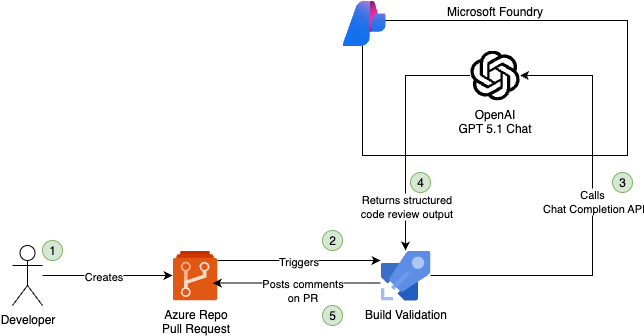
- A developer creates a pull request from a feature branch with main as the target.
- Creating the pull request automatically triggers the configured build validation (Azure Pipeline).
- The build validation pipeline retrieves the code changes between the source and target branches, and then calls the Microsoft Foundry Chat Completion API.
- The model returns a structured JSON output containing the review feedback.
- The JSON output is processed, and the feedback comments are posted on the pull request.
- (Optional feature) If the JSON output is empty, meaning the model returned no review feedback, the pull request can be automatically approved.
Model choice
Microsoft Foundry offers a wide range of models, but for this automated code review implementation, I needed a model that met two critical requirements:
- Effective but cost-efficient: Code reviews happen frequently, so costs can add up quickly.
- Consistent structured JSON output: Essential for reliable follow-up automation.
I chose one of the GPT-5 models from OpenAI, as these models are cost-effective, intelligent, fast in response, and most importantly support structured output. The model used in this implementation is gpt-5.1-chat, but if you have access to gpt-5.1-codex-mini, I advise choosing that instead, as it is more knowledgeable about code and even more cost-efficient than gpt-5.1-chat.
Structured outputs
The key enabler for making this automated code reviewer work is structured output a feature where the model is required to strictly follow a predefined JSON schema. In the implementation, you will see the property strict: true in the API request body. This ensures that the response strictly conforms to the defined JSON schema.
Below is an example of the JSON schema used for the automated code review:
| { | |
| "type": "object", | |
| "properties": { | |
| "reviews": { | |
| "type": "array", | |
| "items": { | |
| "type": "object", | |
| "properties": { | |
| "fileName": { | |
| "type": "string", | |
| "description": "The file path being reviewed" | |
| }, | |
| "lineNumber": { | |
| "type": "integer", | |
| "description": "The line number where the issue occurs" | |
| }, | |
| "comment": { | |
| "type": "string", | |
| "description": "The review comment with emoji, severity, category, explanation and an optional suggested fix" | |
| } | |
| }, | |
| "required": ["fileName", "lineNumber", "comment"], | |
| "additionalProperties": false | |
| } | |
| } | |
| }, | |
| "required": ["reviews"], | |
| "additionalProperties": false | |
| } |
The model will always return data in this exact JSON format without parsing errors, meaning no additional JSON validation logic is required. This reliability is crucial for automation. Later in this blog, you will learn how to use the schema in a script.
Azure DevOps Prerequisites
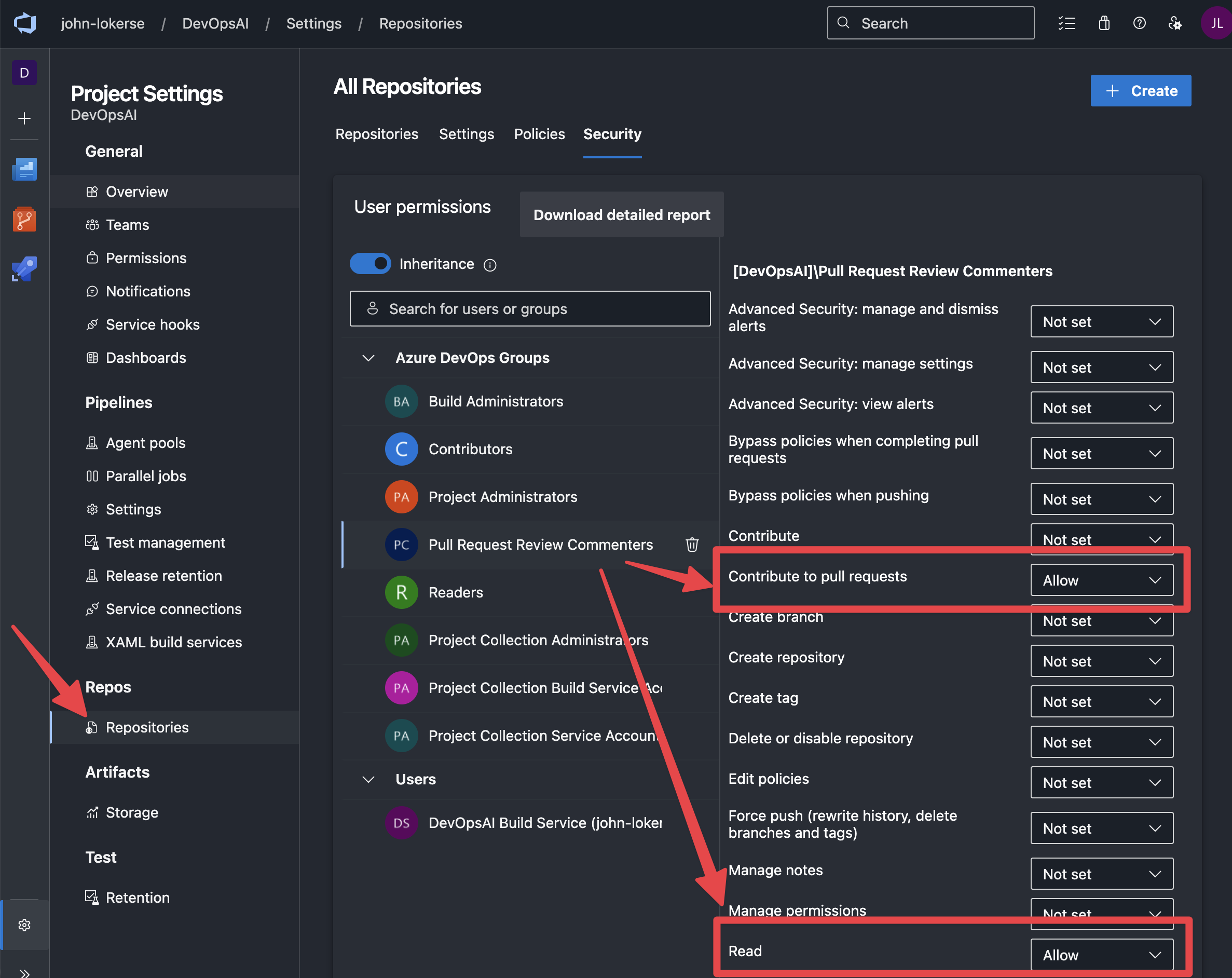
To allow the automated reviewer to post comments on a pull request, the service principal must have the correct permissions:
- If you have not already invite the service principal to the Azure DevOps organisation and give it the access level
Basic. TheBasicaccess level is required because there is interaction with code. - Give access to the Azure DevOps Project. I recommend creating a dedicated Azure DevOps project permission group to scope permissions only for pull request review actions. If you choose to create a new permission group then make sure to set
View project-level informationtoAllow. - Give the permission group permissions to the Azure Repo. Navigate to the Azure DevOps project settings, then go to
Repositoriesand click on theSecuritytab. Add the permission group (or the service principal directly) to the list and configure permissions as shown below:
4. At last, create a service connection and configure this to use the service principal you set the permissions for in Azure DevOps. This service connection will be used by the pipeline to retrieve pull request information and post review comments.
Automated code review
To orchestrate the code review, three PowerShell functions are used:
- Get-CodeChanges.ps1: this function structures the code (or text, since the script is not language-specific) differences between the main branch and a feature branch. It identifies what has changed, which line numbers are affected, and whether code has been added, removed, or modified.
- Invoke-LLMCodeReview.ps1: this function calls the deployed model in Microsoft Foundry to review the code and instructs it to return results in a structured JSON format. This function accepts a system prompt, generates the user prompt by calling
Get-CodeChanges, and sends both to the model. - Set-PullRequestComments.ps1: this function takes the output from
Invoke-LLMCodeReview.ps1and uses it to call the Azure DevOps APIs to post comments on the pull request.
These PowerShell functions are orchestrated through an Azure Pipeline, configured as a build validation to automatically trigger the code review. Let’s take a look at each function.
Get-CodeChanges
This function retrieves code changes between the Source (feature branch) and Target (main branch). It first checks out the target branch, then uses git diff --name-only --diff-filter=AM to get a list of added or modified files.
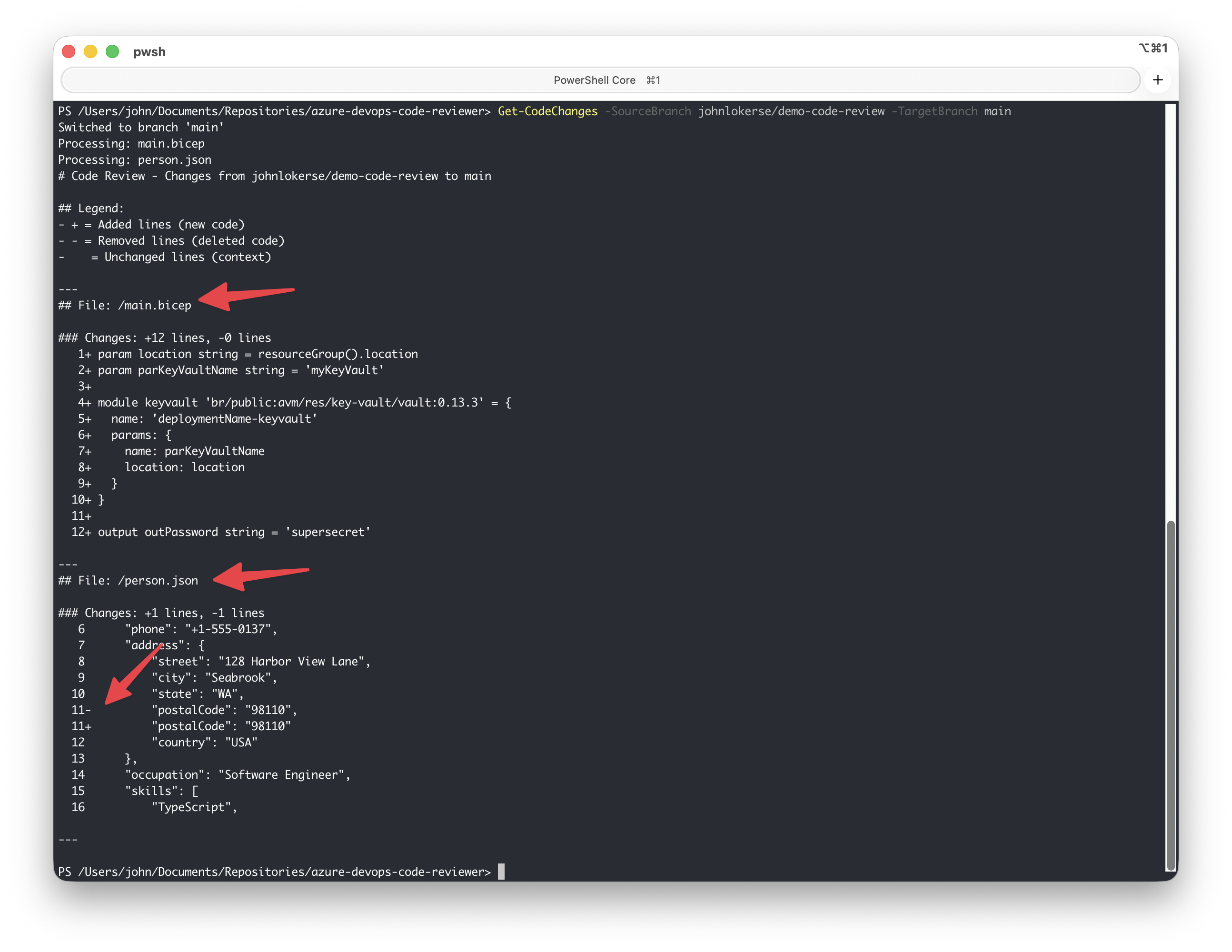
It then loops through each changed file to extract the detailed diff. Each line is prefixed with:
+for added lines-for removed lines- (space) for context lines (unchanged)
Line numbers are added for reference. For larger files with changes in multiple locations, Git organises these into hunks per changed file. Hunks are sections containing the changes plus 5 lines of surrounding context. A legend is also included in the output for clarity on what each change type represents (added, removed, or unchanged).
Note! This function does not output entire files. Only the changes with minimal context. This approach ensures that only relevant code is sent to the model, making the review fast and token efficient. Including full file content would be much more expensive.
| function Get-CodeChanges { | |
| param ( | |
| [string]$TargetBranch, | |
| [string]$SourceBranch | |
| ) | |
| $renamedSourceBranch = $SourceBranch -replace 'refs/heads/', 'origin/' | |
| $renamedTargetBranch = $TargetBranch -replace 'refs/heads/', 'origin/' | |
| # Get changed code files only | |
| $changedFiles = git diff --name-only --diff-filter=AM "$renamedTargetBranch...$renamedSourceBranch" | |
| # Add legend for diff markers | |
| $llmOutput = @" | |
| # Code Review - Changes from $renamedSourceBranch to $renamedTargetBranch | |
| ## Legend: | |
| - `+` = Added lines (new code) | |
| - `-` = Removed lines (deleted code) | |
| - ` ` = Unchanged lines (context) | |
| --- | |
| "@ | |
| foreach ($file in $changedFiles) { | |
| Write-Host "Processing: $file" | |
| # Ensure file path starts with / for full path from repository root | |
| $fullPath = if ($file.StartsWith('/')) { $file } else { "/$file" } | |
| # Get the unified diff with more context | |
| $diffLines = git diff "$renamedTargetBranch...$renamedSourceBranch" --unified=5 -- $file | |
| $llmOutput += "## File: $fullPath`n`n" | |
| # Parse the diff output line by line | |
| $inHunk = $false | |
| $oldLineNum = 0 | |
| $newLineNum = 0 | |
| $hunkContent = @() | |
| $addedLines = 0 | |
| $removedLines = 0 | |
| foreach ($line in $diffLines) { | |
| # Check for hunk header | |
| if ($line -match '^@@ -(\d+)(?:,(\d+))? \+(\d+)(?:,(\d+))? @@') { | |
| # If we were processing a previous hunk, output it | |
| if ($hunkContent.Count -gt 0) { | |
| $llmOutput += "### Changes: +$addedLines lines, -$removedLines lines`n" | |
| $llmOutput += ($hunkContent -join "`n") | |
| $llmOutput += "`n`n" | |
| } | |
| # Reset for new hunk | |
| $hunkContent = @() | |
| $addedLines = 0 | |
| $removedLines = 0 | |
| $inHunk = $true | |
| $oldLineNum = [int]$matches[1] | |
| $newLineNum = [int]$matches[3] | |
| continue | |
| } | |
| # Skip file headers | |
| if ($line -match '^(diff --git|index|\+\+\+|---|\\ No newline)' -or $line.StartsWith('Binary file')) { | |
| continue | |
| } | |
| # Process hunk content | |
| if ($inHunk) { | |
| if ($line.StartsWith('+')) { | |
| # Added line | |
| $hunkContent += "{0,4}+ {1}" -f $newLineNum, $line.Substring(1) | |
| $newLineNum++ | |
| $addedLines++ | |
| } | |
| elseif ($line.StartsWith('-')) { | |
| # Removed line | |
| $hunkContent += "{0,4}- {1}" -f $oldLineNum, $line.Substring(1) | |
| $oldLineNum++ | |
| $removedLines++ | |
| } | |
| elseif ($line.StartsWith(' ')) { | |
| # Context line (unchanged) | |
| $hunkContent += "{0,4} {1}" -f $newLineNum, $line.Substring(1) | |
| $oldLineNum++ | |
| $newLineNum++ | |
| } | |
| else { | |
| # End of hunk | |
| $inHunk = $false | |
| } | |
| } | |
| } | |
| # Output the last hunk if any | |
| if ($hunkContent.Count -gt 0) { | |
| $llmOutput += "### Changes: +$addedLines lines, -$removedLines lines`n" | |
| $llmOutput += ($hunkContent -join "`n") | |
| $llmOutput += "`n" | |
| } | |
| $llmOutput += "`n---`n" | |
| } | |
| return $llmOutput | |
| } |
Example output
The example below shows the result of running Get-CodeChanges on a branch with multiple modified files. In person.json, only the changed line is displayed, along with five lines of context around it.
Invoke-LLMCodeReview
This function orchestrates the AI-powered code review by sending code changes to the model and returning structured code review feedback.
First, a $schema is defined to enforce the required JSON output format. This schema ensures the model returns an array of review items, each containing:
- fileName: the file path being reviewed
- lineNumber: the line where an issue, suggestion, or warning occurs
- comment: the review feedback
The function then builds a $messages array consisting of:
- A system prompt is set via
PathToReviewFile. This file contains the review instructions. - A user prompt is set via function
Get-CodeChangeswhich provides the modified code in an LLM-friendly format.
In the request body ($body), the response_format property is key as it enables structured output by setting type to json_schema. The strict property is set to $true to enforce schema compliance, and the schema property references the defined $schema.
The ModelName and ModelDeploymentUrl parameters determine which model and endpoint are used. Both values can be configured and retrieved within the Microsoft Foundry portal. For example:
- The model name can be:
gpt-5.1-chat - The endpoint would then be:
https://<Microsoft Foundry instance>.cognitiveservices.azure.com/openai/deployments/gpt-5.1-chat/chat/completions?api-version=2025-01-01-preview
Finally, the REST API is called using Bearer token authentication, and a JSON string containing the structured review response is returned.
| function Invoke-LLMCodeReview { | |
| param ( | |
| [parameter(Mandatory)] | |
| [string] | |
| $SourceBranch, | |
| [parameter(Mandatory)] | |
| [string] | |
| $TargetBranch, | |
| [Parameter(Mandatory)] | |
| [string] | |
| $PathToReviewFile, | |
| [parameter(Mandatory)] | |
| [string] | |
| $ModelName, | |
| [parameter(Mandatory)] | |
| [string] | |
| $ModelDeploymentUrl, | |
| [parameter(Mandatory)] | |
| [string] | |
| $Key | |
| ) | |
| $schema = @{ | |
| type = "object" | |
| properties = @{ | |
| reviews = @{ | |
| type = "array" | |
| items = @{ | |
| type = "object" | |
| properties = @{ | |
| fileName = @{ | |
| type = "string" | |
| description = "The file path being reviewed" | |
| } | |
| lineNumber = @{ | |
| type = "integer" | |
| description = "The line number where the issue occurs" | |
| } | |
| comment = @{ | |
| type = "string" | |
| description = "The review comment with emoji, severity, category, explanation and an optional suggested fix" | |
| } | |
| } | |
| required = @("fileName", "lineNumber", "comment") | |
| additionalProperties = $false | |
| } | |
| } | |
| } | |
| required = @("reviews") | |
| additionalProperties = $false | |
| } | |
| [string] $changes = Get-CodeChanges -SourceBranch $SourceBranch -TargetBranch $TargetBranch | Out-String | |
| Write-Host "Code changes to review:`n$changes" | |
| # Completion text | |
| $messages = @() | |
| $messages += @{ | |
| role = 'system' | |
| content = @( | |
| @{ | |
| type = "text" | |
| text = Get-Content -Path $PathToReviewFile -Raw | |
| } | |
| ) | |
| } | |
| $messages += @{ | |
| role = 'user' | |
| content = @( | |
| @{ | |
| type = "text" | |
| text = $changes | |
| } | |
| ) | |
| } | |
| # Header for authentication | |
| $headers = [ordered]@{ | |
| "Authorization" = "Bearer $($Key)" | |
| } | |
| # Adjust these values to fine-tune completions | |
| $body = [ordered]@{ | |
| model = $ModelName | |
| messages = $messages | |
| response_format = @{ | |
| type = "json_schema" | |
| json_schema = @{ | |
| name = "CodeReviewResponse" # A required property | |
| strict = $true # Recommended for structured outputs | |
| schema = $schema # The JSON schema that defines the expected response structure | |
| } | |
| } | |
| } | ConvertTo-Json -Depth 99 | |
| $response = Invoke-RestMethod ` | |
| -Uri $ModelDeploymentUrl ` | |
| -Headers $headers ` | |
| -Body $body ` | |
| -Method Post ` | |
| -ContentType 'application/json' | |
| if ($ModelName -eq "model-router") { | |
| Write-Host "Response from $ModelName using $($response.model):" | |
| Write-Host ($response.choices.message.content | ConvertTo-Json) | |
| } else { | |
| Write-Host "Response from $($ModelName):" | |
| Write-Host ($response.choices.message.content | ConvertTo-Json) | |
| } | |
| return $response.choices.message.content | |
| } |
Example output
The example below shows the output generated by Invoke-LLMCodeReview:
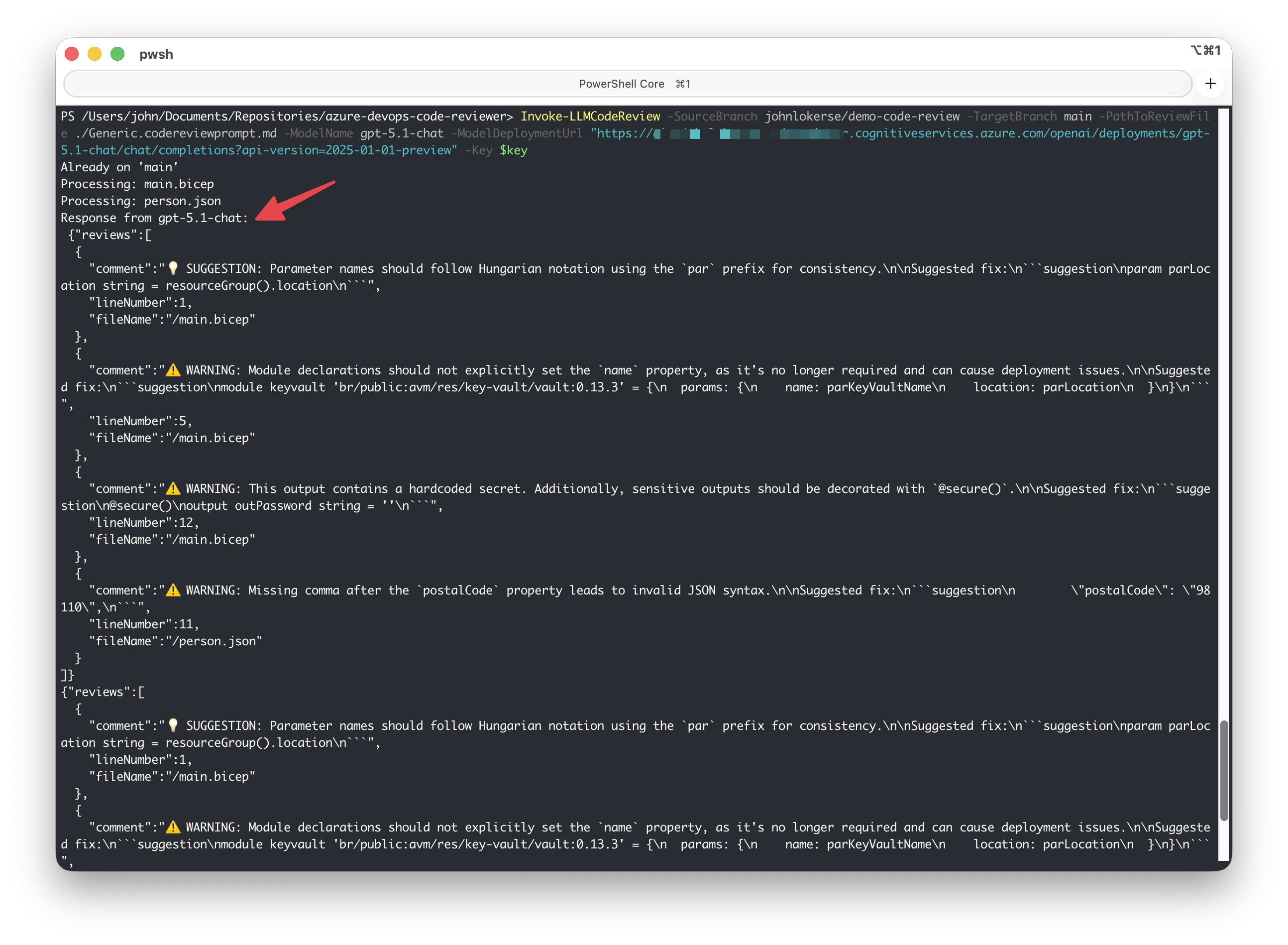
comment, lineNumber and fileName.Set-PullRequestComments
This function processes the structured JSON output from Invoke-LLMCodeReview and posts the code review comments on the exact line of code in the Azure DevOps pull request.
Before posting comments, the function retrieves all existing comment threads on the pull request and builds a lookup table of comments previously posted by the logged in user (the service principal). This prevents duplicate comments if the pipeline runs multiple times. To identify the user, the function calls the connectionData API to retrieve the user’s identity properties.
Each new review item is posted as a comment thread at the corresponding file and line number using the Azure DevOps Pull Request Threads API. An optional feature you can enable is automatic approval. When the AllowApproval parameter is set, the identity used to post comments will also approve the pull request if the model returns no feedback.
| function Set-PullRequestComments { | |
| param ( | |
| [parameter(Mandatory)] | |
| [string] | |
| $Organization, | |
| [parameter(Mandatory)] | |
| [int] | |
| $PullRequestId, | |
| [Parameter(Mandatory)] | |
| [string] | |
| $RepositoryName, | |
| [parameter(Mandatory)] | |
| [string] | |
| $Project, | |
| [parameter(Mandatory)] | |
| [string] | |
| $Reviews, | |
| [parameter()] | |
| [switch] | |
| $AutoApprove | |
| ) | |
| $token = (New-Object System.Management.Automation.PSCredential("token", (Get-AzAccessToken -ResourceUrl "499b84ac-1321-427f-aa17-267ca6975798" -AsSecureString).token)).GetNetworkCredential().Password | |
| $headers = @{ | |
| Authorization = "Bearer $token" | |
| "Content-Type" = "application/json" | |
| } | |
| # Get current authenticated user from Azure DevOps | |
| $connectionData = Invoke-RestMethod -Uri "https://dev.azure.com/$Organization/_apis/connectionData" -Headers $headers -Method Get | |
| $currentUserName = $connectionData.authenticatedUser.providerDisplayName | |
| Write-Host "Checking for existing comments from: $currentUserName" | |
| # Get existing threads | |
| $getThreadsUrl = "https://dev.azure.com/$Organization/$Project/_apis/git/repositories/$RepositoryName/pullRequests/$PullRequestId/threads?api-version=7.1" | |
| try { | |
| $existingThreads = Invoke-RestMethod -Uri $getThreadsUrl -Headers $headers -Method Get | |
| } | |
| catch { | |
| Write-Warning "Failed to retrieve existing threads, continuing without duplicate check..." | |
| $existingThreads = $null | |
| } | |
| # Build a lookup hashtable of existing comments by file:line | |
| $existingComments = @{} | |
| if ($existingThreads) { | |
| foreach ($thread in $existingThreads.value) { | |
| # Skip deleted threads or threads without context | |
| if ($thread.isDeleted -or -not $thread.threadContext -or -not $thread.threadContext.filePath) { | |
| continue | |
| } | |
| if ($thread.status -notin @("active", "pending", "fixed", "wontFix", "closed")) { | |
| continue | |
| } | |
| # Check if any comment is from the current user (not deleted) | |
| $hasUserComment = $thread.comments | Where-Object { | |
| $_.author.displayName -eq $currentUserName | |
| } | Select-Object -First 1 | |
| if ($hasUserComment) { | |
| # Normalize file path (lowercase, ensure leading /) | |
| $normalizedPath = $thread.threadContext.filePath.ToLower() | |
| if (-not $normalizedPath.StartsWith('/')) { | |
| $normalizedPath = "/$normalizedPath" | |
| } | |
| $key = "$normalizedPath|$($thread.threadContext.rightFileStart.line)" | |
| $existingComments[$key] = $true | |
| } | |
| } | |
| } | |
| # Parse and validate reviews | |
| $reviewsObject = $Reviews | ConvertFrom-Json | |
| if ($null -eq $reviewsObject.reviews -or $reviewsObject.reviews.Count -eq 0) { | |
| Write-Host "No reviews to post." | |
| if ($AutoApprove) { | |
| Write-Host "AutoApprove enabled: Approving pull request..." -ForegroundColor Cyan | |
| $reviewerId = $connectionData.authenticatedUser.id | |
| $approveUrl = "https://dev.azure.com/$Organization/$Project/_apis/git/repositories/$RepositoryName/pullRequests/$PullRequestId/reviewers/$($reviewerId)?api-version=7.1" | |
| $approveBody = @{ | |
| vote = 10 | |
| } | |
| try { | |
| $null = Invoke-RestMethod -Uri $approveUrl -Headers $headers -Method Put -Body ($approveBody | ConvertTo-Json -Depth 10) | |
| Write-Host "Pull request approved successfully." -ForegroundColor Green | |
| } | |
| catch { | |
| Write-Warning "Failed to approve pull request: $_" | |
| } | |
| } | |
| return | |
| } | |
| # Filter out duplicate reviews | |
| $newReviews = $reviewsObject.reviews | Where-Object { | |
| # Normalize file path | |
| $normalizedPath = $_.fileName.ToLower() | |
| if (-not $normalizedPath.StartsWith('/')) { | |
| $normalizedPath = "/$normalizedPath" | |
| } | |
| $key = "$normalizedPath|$($_.lineNumber)" | |
| # Keep only reviews that don't exist yet | |
| -not $existingComments.ContainsKey($key) | |
| } | |
| if ($newReviews.Count -eq 0) { | |
| Write-Host "All comments already exist. No new comments to post." -ForegroundColor Yellow | |
| return | |
| } | |
| $skipped = $reviewsObject.reviews.Count - $newReviews.Count | |
| if ($skipped -gt 0) { | |
| Write-Host "Skipping $skipped duplicate comment(s)" -ForegroundColor Yellow | |
| } | |
| # Post new reviews | |
| $createThreadUrl = "https://dev.azure.com/$Organization/$Project/_apis/git/repositories/$RepositoryName/pullRequests/$PullRequestId/threads?api-version=7.1" | |
| foreach ($review in $newReviews) { | |
| # Determine line range for suggestions | |
| $startLine = $review.lineNumber | |
| $endLine = $review.lineNumber | |
| $endOffset = 1000 | |
| $threadBody = @{ | |
| comments = @( | |
| @{ | |
| parentCommentId = 0 | |
| content = $review.comment | |
| commentType = 1 | |
| } | |
| ) | |
| status = 1 | |
| threadContext = @{ | |
| filePath = $review.fileName | |
| rightFileStart = @{ line = $startLine; offset = 1 } | |
| rightFileEnd = @{ line = $endLine; offset = $endOffset } | |
| } | |
| } | |
| try { | |
| $response = Invoke-RestMethod -Uri $createThreadUrl -Headers $headers -Method Post -Body ($threadBody | ConvertTo-Json -Depth 10) | |
| Write-Host "Comment posted on '$($review.fileName)' line $($review.lineNumber) (Thread ID: $($response.id))" -ForegroundColor Green | |
| } | |
| catch { | |
| Write-Warning "Failed to post comment on '$($review.fileName)' line $($review.lineNumber): $_" | |
| } | |
| } | |
| } |
Azure Pipeline for Build Validation
The Azure Pipeline uses the AzurePowerShell@5 task with a service connection to authenticate against Azure DevOps. The pipeline is configured to trigger via a Pull Request branch policy. This ensures that the code review runs for every newly created pull request. Learn more about branch policies and build validations.
The task first calls Invoke-LLMCodeReview, using:
- Predefined Azure DevOps variables for source and target branch information
- A model name and deployment URL
- The path to the code review prompt file
- The API key loaded from an Azure DevOps variable group (
vg-foundry). If you prefer an Azure Key Vault this can be used too.
Finally, Set-PullRequestComments posts the structured review output as inline comments on the pull request.
| trigger: none | |
| pool: | |
| vmImage: ubuntu-latest | |
| variables: | |
| - group: vg-foundry | |
| steps: | |
| - checkout: self | |
| persistCredentials: true | |
| fetchDepth: 0 | |
| - task: AzurePowerShell@5 | |
| displayName: 'Automated Code Reviewer' | |
| inputs: | |
| azureSubscription: sc-devops-code-reviewer | |
| ScriptType: 'InlineScript' | |
| azurePowerShellVersion: LatestVersion | |
| pwsh: true | |
| Inline: | | |
| . ./Get-CodeChanges.ps1 | |
| . ./Invoke-LLMCodeReview.ps1 | |
| . ./Set-PullRequestComments.ps1 | |
| [string]$changes = Invoke-LLMCodeReview ` | |
| -SourceBranch $(System.PullRequest.SourceBranch) ` | |
| -TargetBranch $(System.PullRequest.TargetBranch) ` | |
| -PathToReviewFile './Generic.reviewpromtpfile.md' ` | |
| -ModelName 'gpt-5.1-chat' ` | |
| -ModelDeploymentUrl 'https://<Microsoft Foundry Instance>.cognitiveservices.azure.com/openai/deployments/gpt-5.1-chat/chat/completions?api-version=2025-01-01-preview' ` | |
| -Key $(foundry-key) | |
| Set-PullRequestComments ` | |
| -Organization ("$(System.CollectionUri)" -split "/" | Select-Object -index 3) ` | |
| -PullRequestId $(System.PullRequest.PullRequestId) ` | |
| -Project $(System.TeamProject) ` | |
| -RepositoryName $(Build.Repository.Name) ` | |
| -Reviews $changes |
In action
To demonstrate the output, three scenarios are shown:
- A single file review (Azure Bicep)
- A multi file review (JSON, PowerShell and Azure Bicep)
- A review with no comments returned
These files are used to demonstrate the code reviewer capabilities and have obvious mistakes and errors.
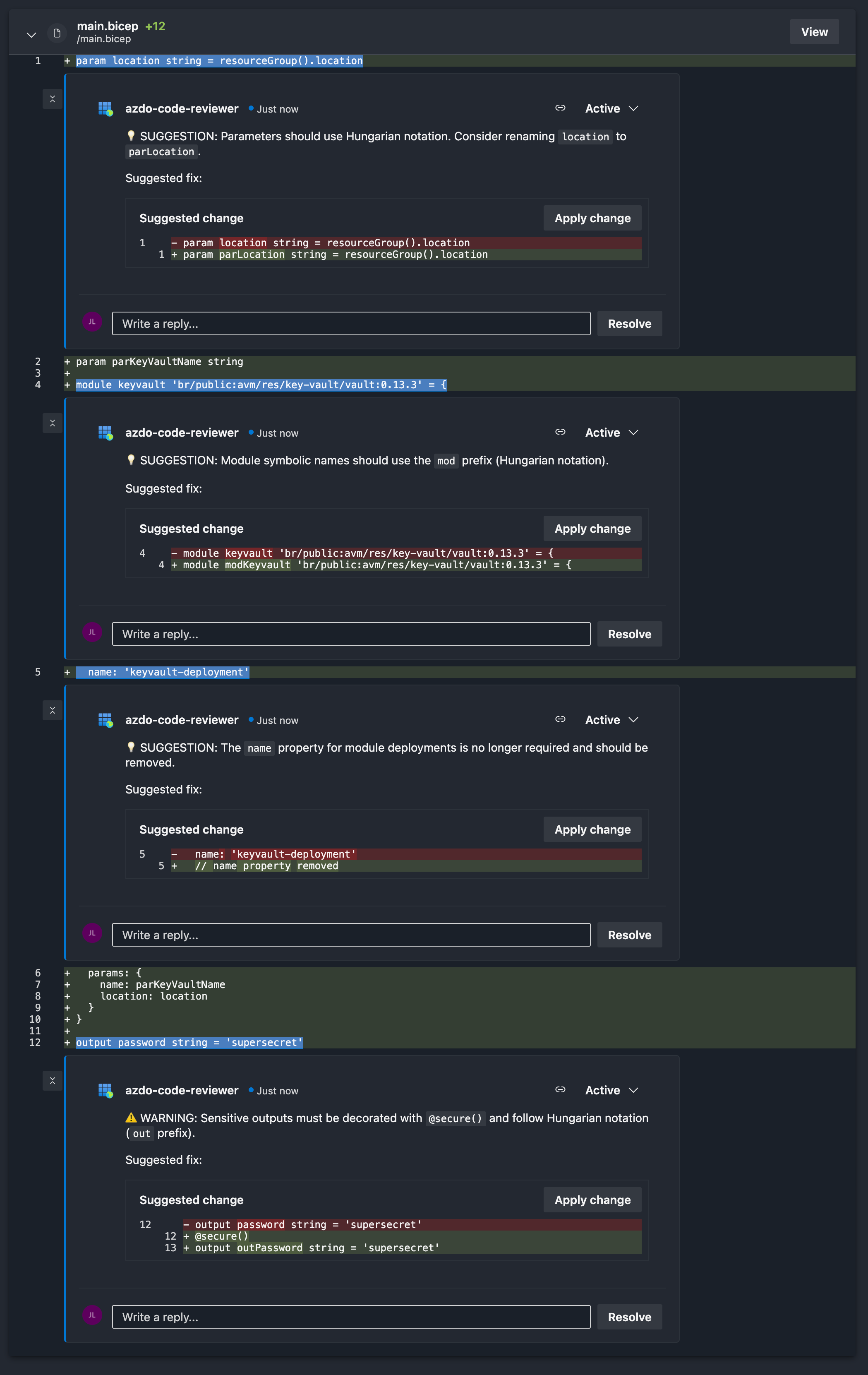
Single file review
In the image below, an Azure Bicep file is reviewed using a code review prompt file specifically written for Azure Bicep code.
Each review entry includes a description, a suggested fix, and a comment linked to the exact line number.
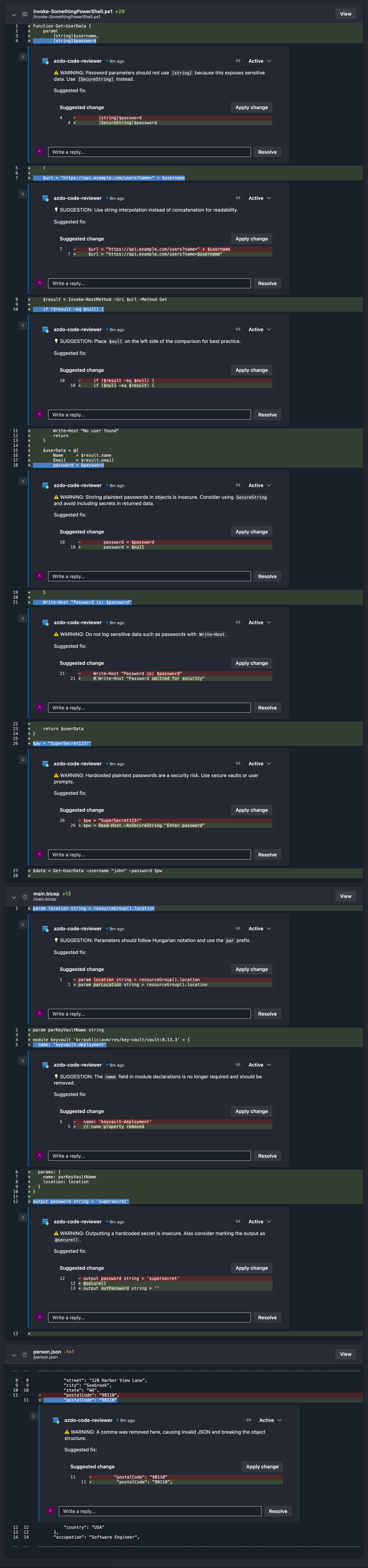
Multi file review
In the image below, multiple files (JSON, PowerShell, and Azure Bicep) are reviewed together. Each review includes a description, a suggested fix, and a comment linked to the specific line number. A generic review prompt was created for JSON, PowerShell, and Azure Bicep files to generate these results.
(Click to enlarge)
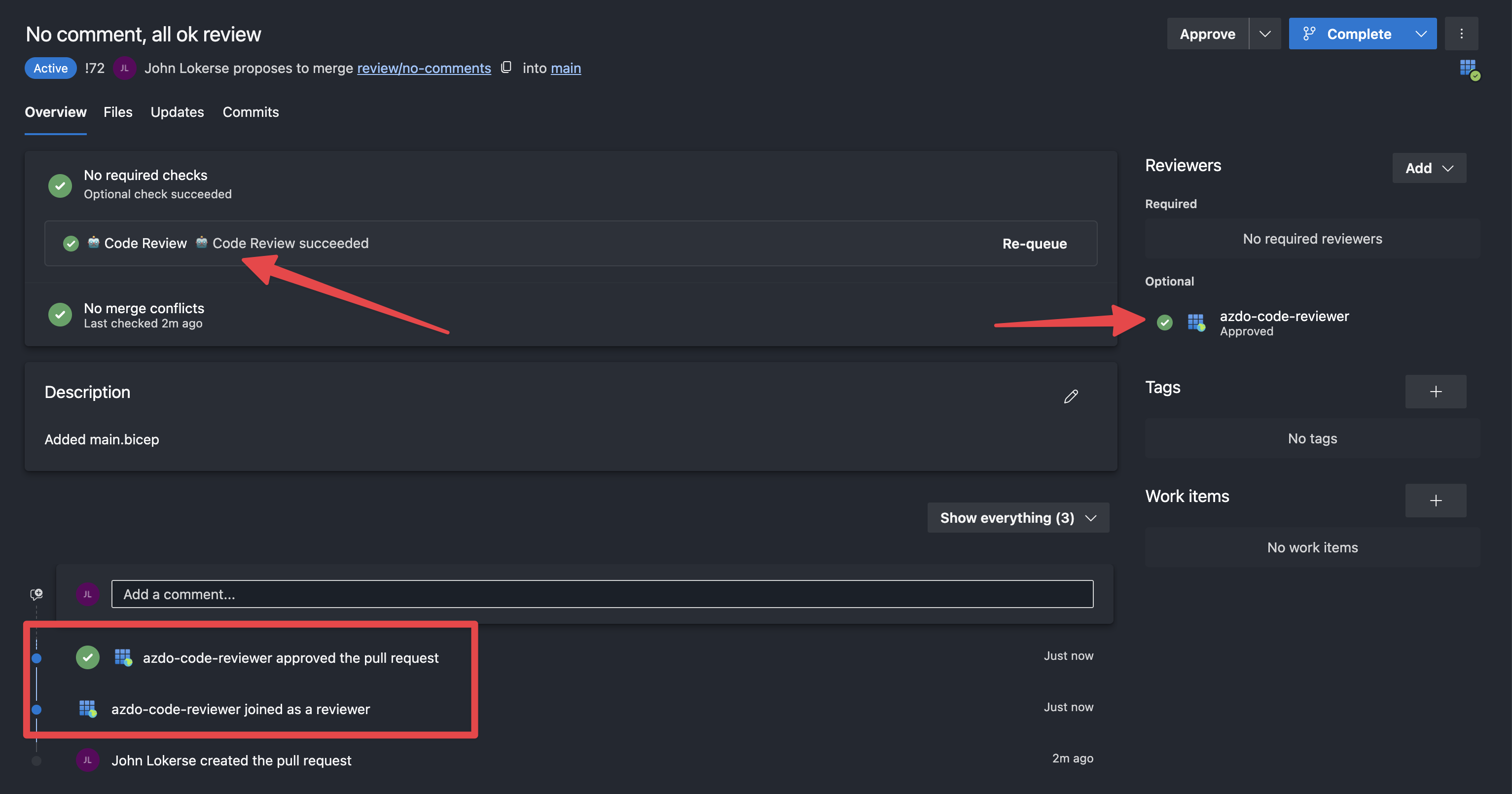
A review without comments returned
In the image below, the code review was completed without any comments. This indicates that the model found no issues in the changed code. Because the AutoApprove parameter was enabled on the build validation, the code review identity automatically joined the pull request as a reviewer and approved it.
Personalisation
You can personalise the code review by bringing your own code review prompt file. A code review prompt file is a Markdown file that contains review guidelines for the model by specifying what to review and how to review it. You can tailor it for a specific programming or scripting language, or create a generic prompt file that includes rules for multiple file types.
If you are not reviewing code but text content (such as documentation or instructions), you can even create a spelling/grammar review prompt file. The possibilities with this setup are endless.
Below are two example code review prompt files:
- Code review instructions for JSON, PowerShell and Azure Bicep files: https://github.com/johnlokerse/azure-devops-code-review-scripts/blob/main/Generic.codereviewprompt.md
- Code review instructions for Azure Bicep: https://github.com/johnlokerse/azure-devops-code-review-scripts/blob/main/Bicep.codereviewprompt.md
Cost optimisation using a router
In the current setup, the same model is used for every pull request, regardless of complexity. Microsoft Foundry offers a model called model-router a large language model trained to analyse the user message (not the system message) and determine the appropriate model based on complexity. It then automatically routes the request to the appropriate and cost-efficient model.
For a code review workflow, routing could look like this:
- Simple pull requests (typos/minor refactoring) are routed to gpt-5.1-nano
- Medium pull requests (new feature additions/bug fixes) are routed to gpt-5.1-mini
- Complex pull requests (complex logic) are routed to gpt-5.1-chat
Routing models means that the model choice is flexible, and most importantly it lowers the cost since you don’t use “overkill” models for smaller or simpler pull requests.
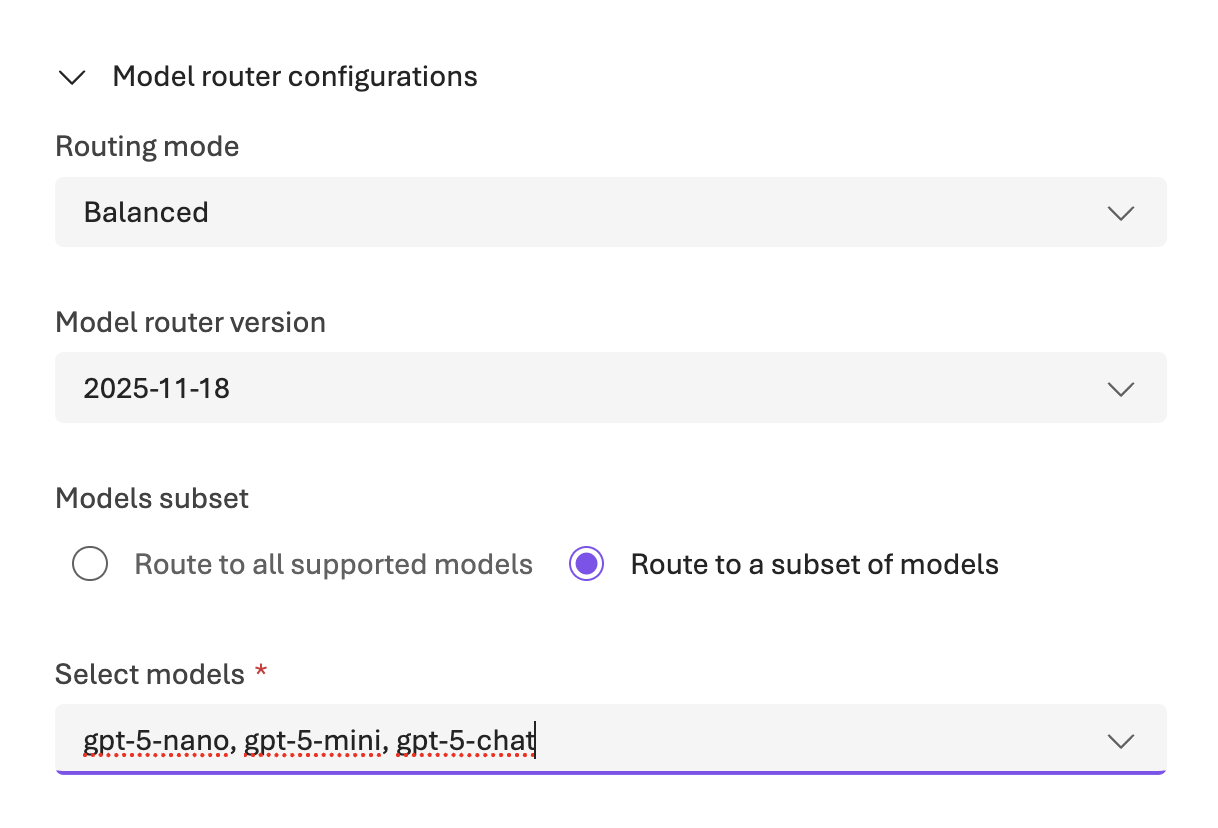
Microsoft Foundry configuration
To use the model router, you must deploy it in Microsoft Foundry and configure it with a model set. In the image below, the routing mode is configured as Balanced, which optimises for both output quality and cost. Also, a specific subset of models is selected for routing: gpt-5-nano, gpt-5-mini, and gpt-5-chat.
Additionally, you have to set the value to model-router at the parameter ModelName on the build validation pipeline and the ModelDeploymentUrl must be set accordingly too: https://<Microsoft Foundry Instance>.cognitiveservices.azure.com/openai/deployments/model-router/chat/completions?api-version=2025-01-01-preview.
See the list of supported models you can use in the router here: underlying router models per version.
Lessons learned
- Deterministic output is not guaranteed. In my experience, 90% of the time, I get consistent code review results, meaning each review output is equal to what I expect, but sometimes it does not return a review for a line of code that has been reviewed before, or it does not review the line of code that I expected it to.
- Suggested code changes are a hit or miss. As you might have seen in the examples, some suggestions are good, and some are bad or incorrect and require you to change the code via your editor instead of via the “apply changes” button. For example, there is a suggestion to comment out code instead of deleting it. To fix this, having a verbose and explicit prompt for suggested code in your code review prompt file is recommended.
Conclusion
This approach demonstrates how AI can automatically perform code reviews in Azure DevOps pull requests. It offers fast, on-demand review feedback, improves pull-request quality, and reduces review effort.
The setup integrates naturally into Azure DevOps through build validations and predefined pipeline variables, while still allowing full customisation of review rules and prompts.
As always, when working with AI, review the output carefully to ensure correctness. Be critical of the feedback you receive!
Link to repository containing all the scripts: https://github.com/johnlokerse/azure-devops-code-review-scripts
 John Lokerse | Azure & DevOps Engineering