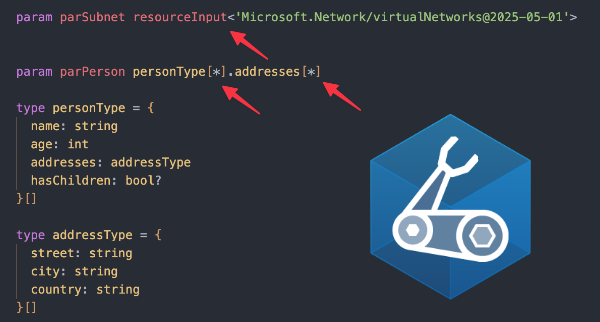
Azure Bicep has become much better over the years at helping you write strongly typed Infrastructure as Code. With features such as user-defined types, typed variables, and resource-derived types, you can make your templates more predictable and easier to maintain.
Recently I noticed the [*] syntax which can look a bit strange when you see it for the first time:
| param subnetName resourceInput<'Microsoft.Network/virtualNetworks@2024-10-01'>.properties.subnets[*].name |
In this blog, you will learn what [*] means in this specific scenario in Azure Bicep, how it works with resource-derived types, user-defined types, and how you can use it to create strongly typed parameters.
What are resource-derived types?
Before we look at [*], it is important to understand where this syntax is used. With user-defined types, you can define your own types in Bicep using the type keyword. If you want to learn more about user-defined types check out my blog post on this topic.
An example of a user-defined type:
| type personType = { | |
| name: string | |
| age: int | |
| } | |
| param parPerson personType |
This is useful when you want to define your own structure. However, sometimes you do not want to create the type manually. For example, mapping Azure resources with user-defined types can add complexity and increase maintenance. That is where resource-derived types are useful, because they allow you to reuse a type from an Azure resource schema instead of defining it yourself.
Resource-derived types allow you to derive a type directly from the Azure resource schema using resourceInput<api@version> or resourceOutput<api@version>. For example:
| param parKind resourceInput<'Microsoft.Storage/storageAccounts@2024-01-01'>.kind |
In this example, the parameter type is derived from the kind property of the storage account resource schema. This means that Bicep understands the allowed values for the kind property without you having to define them manually or via your own user-defined type.
The benefit is that the lifecycle is handled on the Azure side. When new properties or values become available, you only need to update the API version and continue using the Azure resource schema as the source of truth.
Arrays in resource schemas
Azure resource schemas often contain arrays. A good example is the subnets property of a virtual network:
| resource resVirtualNetwork 'Microsoft.Network/virtualNetworks@2025-05-01' = { | |
| name: 'vnet-demo' | |
| location: resourceGroup().location | |
| properties: { | |
| addressSpace: { | |
| addressPrefixes: [ | |
| '10.0.0.0/16' | |
| ] | |
| } | |
| subnets: [ | |
| { | |
| name: 'snet-app' | |
| properties: { | |
| addressPrefix: '10.0.1.0/24' | |
| } | |
| } | |
| { | |
| name: 'snet-data' | |
| properties: { | |
| addressPrefix: '10.0.2.0/24' | |
| } | |
| } | |
| ] | |
| } | |
| } |
When you derive a type from properties.subnets, you get the type of the complete subnets array:
| param subnets resourceInput<'Microsoft.Network/virtualNetworks@2024-10-01'>.properties.subnets |

This means the parameter now expects an array of subnet objects (Subnet[]). However, sometimes you might not want the full array type, but only the type of a single item inside that array. This is where the [*] expression comes in handy.
What does [*] expression mean?
I could not find an official name for [*] in the Microsoft documentation, but I found that they call it type member access in an error message, so in this blog I will call it the member access expression. Essentially, the expression selects the item type from an array.
For example, if the array is a string array, the selected item type is string. If the array contains objects based on a user-defined type, the selected item type is that user-defined type.
Note! Member access only works on arrays.
Expression examples
For demonstration, below are three examples: accessing a type from resourceInput<>, accessing a user-defined type, and working with arrays that contain multiple data types.
Resource-derived types
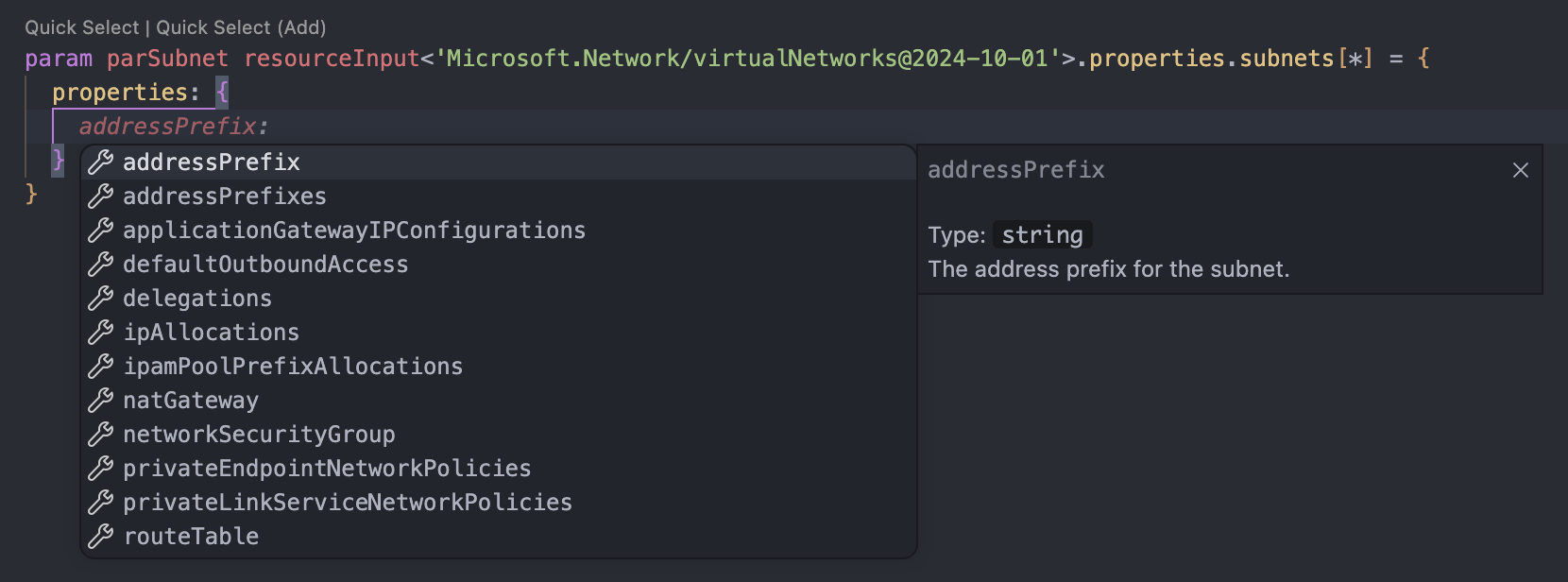
In the example below, the Microsoft.Network/virtualNetworks resource API is referenced in the resourceInput<> type. The subnets property in the resource API is Subnet[], but with [*] you can access the underlying item type of the array, namely Subnet.
| param parSubnet resourceInput<'Microsoft.Network/virtualNetworks@2024-10-01'>.properties.subnets[*] |
As you can see in the images below, the parameter is now bound to the Subnet data type instead of Subnet[]. You can now define a single subnet object using the Azure resource schema.

User-defined type
In the example below, you see two parameters parMemberAccessFromImportedTypes and parMemberAccessUserDefinedType.
The parameter parMemberAccessFromImportedTypes uses an imported user-defined type from Azure Verified Modules, selecting the privateDnsZoneGroupConfigs type with [*].
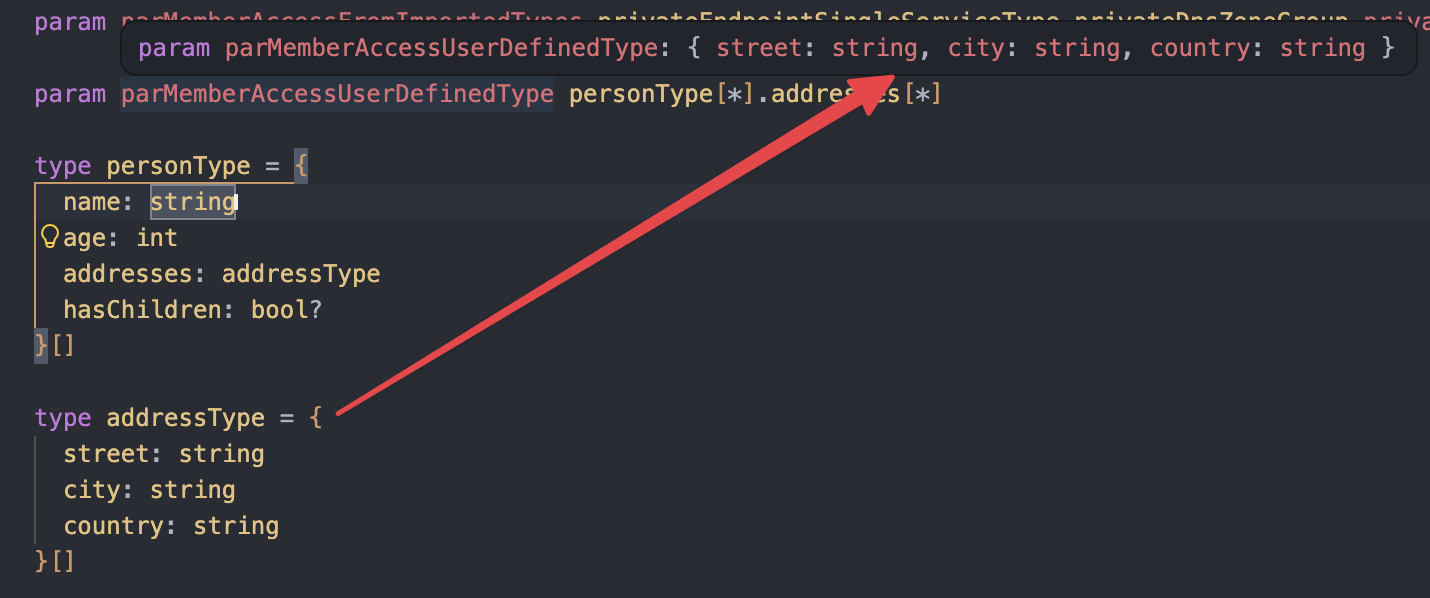
The parMemberAccessUserDefinedType parameter uses a user-defined type defined in the Bicep template and chains member access twice. Since personType is an array, the first [*] selects a single person object. Accessing .addresses then gives an addressType[], which is an array, so the second [*] selects the single addressType.
The Bicep template:
| import { privateEndpointSingleServiceType } from 'br/public:avm/utl/types/avm-common-types:0.7.0' | |
| param parMemberAccessFromImportedTypes privateEndpointSingleServiceType.privateDnsZoneGroup.privateDnsZoneGroupConfigs[*] | |
| param parMemberAccessUserDefinedType personType[*].addresses[*] | |
| type personType = { | |
| name: string | |
| age: int | |
| addresses: addressType | |
| hasChildren: bool? | |
| }[] | |
| type addressType = { | |
| street: string | |
| city: string | |
| country: string | |
| }[] |
Member access using an imported type:

Member access to addressType:
Mixed data type arrays
Using [*] to select an item type from an inline array that contains multiple inferred types is not possible. The member accessor is only available with arrays that have an explicit data type (also called a named type).
For example, the following array contains a string, int, bool, object, and a nested array:
| param parArrayMultipleTypes [ | |
| 'westeurope' | |
| 42 | |
| true | |
| { | |
| name: 'object' | |
| enabled: true | |
| } | |
| [ | |
| 'nested' | |
| 'array' | |
| ] | |
| ] |
If you add the member access expression you will get a compiler error:
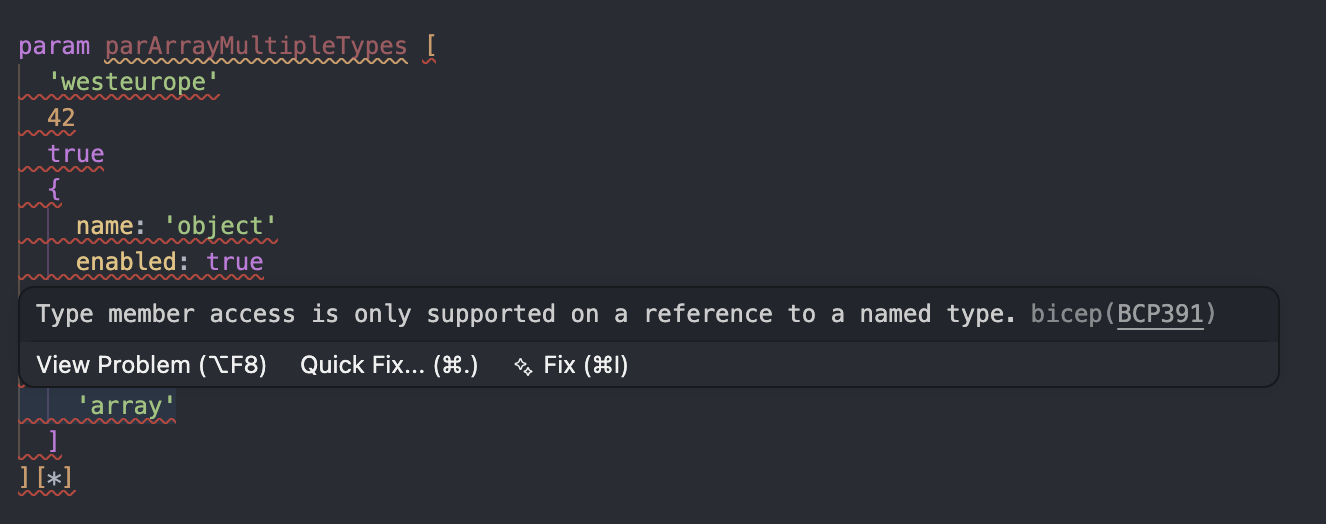
This means that the expression doesn’t work with arrays that contain mixed data types.
Expression [*] is not the same as *
In Azure Bicep, there is another asterisk syntax for user-defined types that looks similar but has a different purpose. For example:
| type tagsType = { | |
| *: string | |
| } |
This means that every property value in the object must be a type string. In this case, you can add multiple string properties to this user-defined type without predefining them. It is useful when you want to allow dynamic property names, but still enforce the type of the values:
| param tags tagsType = { | |
| firstName: 'John' | |
| lastName: 'Doe' | |
| } |
So the differences are:
[*]: Selects the item type of an array in a type expression*: Defines a wildcard property constraint in an object type
Azure Resource Manager
The member access expression is solely a Bicep construct. There is no Azure Resource Manager (ARM) equivalent for [*]. This means that [*] is only used by the Bicep compiler while it validates and compiles the template. After compilation, the generated ARM template does not contain resourceInput<>, resourceOutput<>, or [*]. Instead, it contains either references to user-defined type definitions or metadata pointing to an Azure resource API schema path.
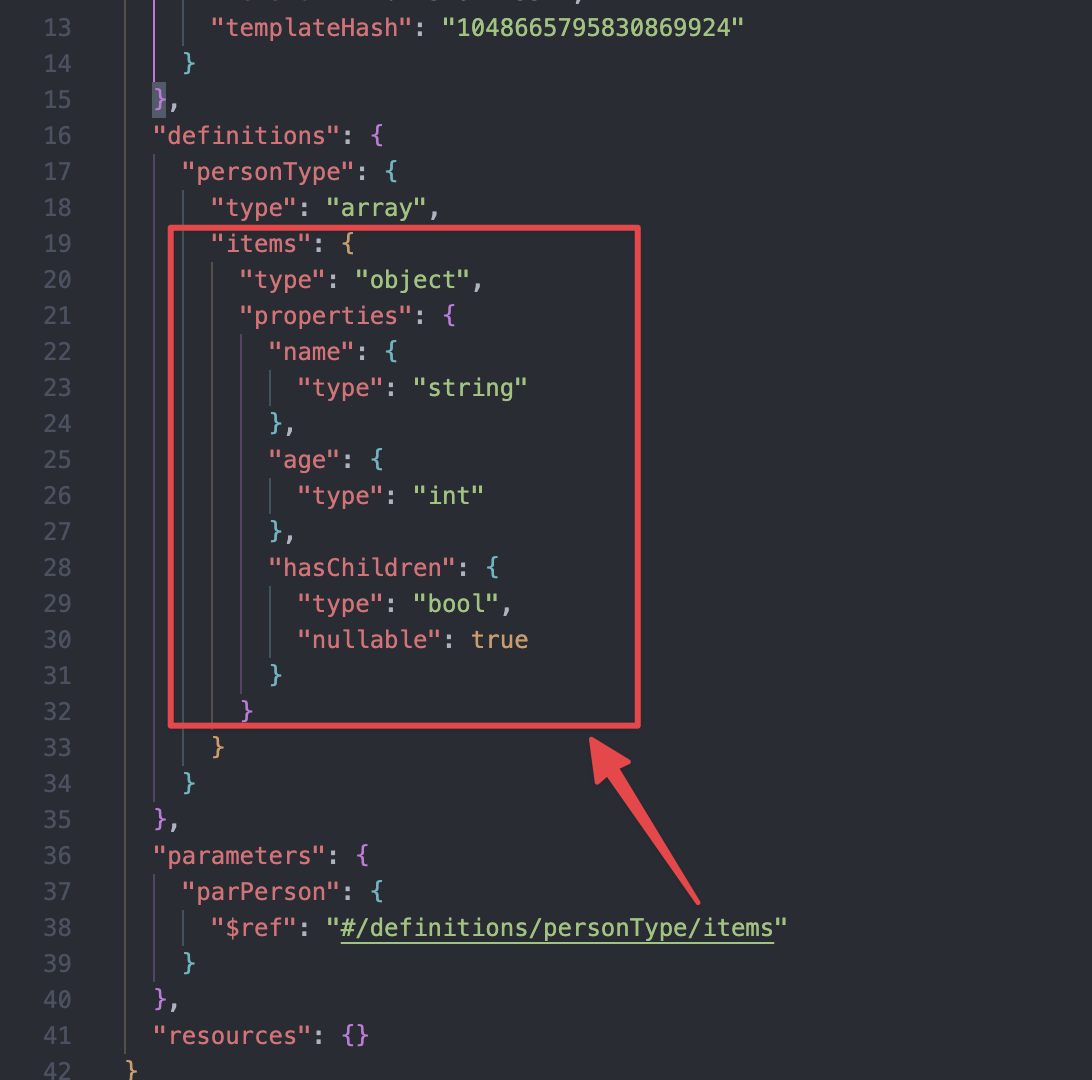
For example, in the following Bicep snippet, the parPerson parameter uses personType[*]. Since personType is an array, [*] selects the item type of that array:
| param parPerson personType[*] | |
| type personType = { | |
| name: string | |
| age: int | |
| hasChildren: bool? | |
| }[] |
When Bicep compiles this template:
- The Bicep file is converted to an ARM JSON template.
- The user-defined type is added to the ARM template as a definition.
- The
parPersonparameter does not containpersonType[*]anymore. Instead, it references theitemsschema from the generated definition.
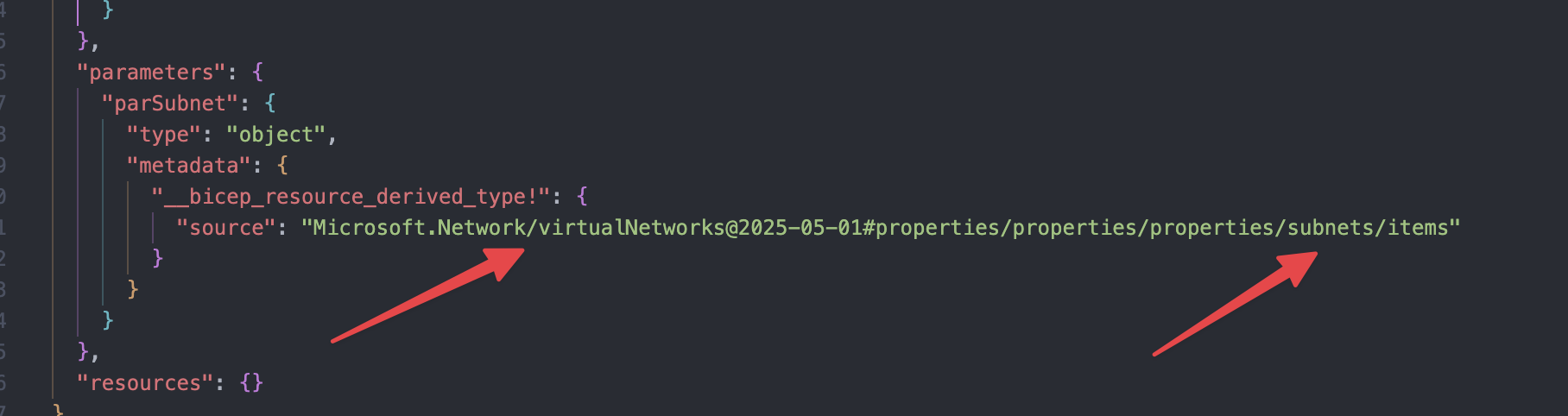
The same principle applies when using resourceInput<> or resourceOutput<>. However, resource-derived types are different from user-defined types in the generated ARM template. The generated ARM template does not contain a full resource-derived type definition. Instead, during compilation Bicep emits metadata containing a pointer to the originating Azure resource API schema path.
For example, after compiling this Bicep type expressionresourceInput<'Microsoft.Network/virtualNetworks@2025-05-01'>.properties.subnets[*] the ARM template will be as follows:
Conclusion
Member access ([*]) in Azure Bicep can be a useful feature when working with resource-derived types. It allows you to navigate from an array type to the type of a single item in that array so you can use that type in your Bicep templates without having to define it yourself as a user-defined type.
When you are writing or maintaining Bicep templates, this helps you move away from generic object and array parameters and towards strongly typed, predictable, and easier to maintain Infrastructure as Code.
 John Lokerse | Azure & DevOps Engineering